HOW TO AUTOMICALLY UNBLOCK THE WHATSAPP There Are 2 Ways To Talk With The Unblocked Person 1.Creating group With The Blocked Person 2. Delete The Whatsapp Account Of Blocked Number And Create The New Account In The Number
HOW TO DISPLAY THE ANDROID PHONE SCREEN IN PC/LAPTOP USING INTERNET HOW TO DISPLAY THE ANDROID PHONE SCREEN IN PC/LAPTOP USING INTERNET Go To Pc/Laptop DOWNLOAD The Team Viewer Just Install In Pc Go To Android Mobile Phone DOWNLOAD The Team Viewer Quick Support From Here OR Go To Play Store In Android Phone Download From Their After Installed Just Open It Copy The Your Id From Android Phone And Paste In Partner ID In Pc/Laptop Just Click-->Connect To Partner Just Click-->Allow Your Mobile Phones Is Appear In Pc/Laptop Screen IMPORTANT: Don't Forgot To Connect In Internet(Pc/Laptop And Mobile Phones)
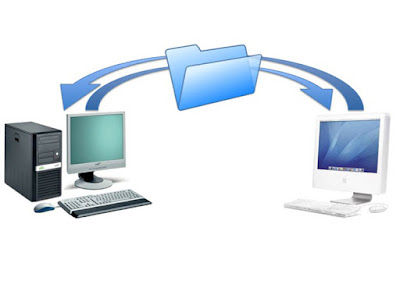
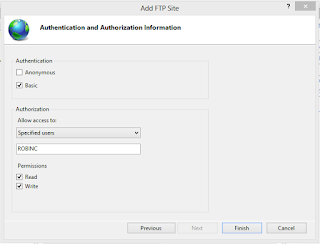
HOW TO STEPUP FTP SERVER IN WINDOWS 8 HOW TO STEPUP FTP SERVER IN WINDOWS 8 Create A New Folder In Desktop And Copy The Data In It For Example: Nothing is impossible Display Like It Go To Control Panel And View As Large Icon Display Like It Go To Programs And Features Display Like It Click-->Turn Windows Features ON/OFF Display Like It Tick The Box Following Screenshot Go To Control Panel And Click The Administrative Tools Display Like It Click The Internet Information Service(IIS) Manager Display Like It Click-->NO Right Click The Sites And Select Add FTP site Display Like It Enter The Site Information Enter The Binding And SSL Settings Enter The Authentication And Authorization Information Display Like It Go To Control Panel And Click-->Windows Firewall Click-->Turn Windows Firewall ON/OFF And Turn OFF The Public And Private Network Settings Display Like It Click-->Allow An App Or Feature Through Windows Firewall Display Like It Select FTP Server In Private And Public And Click OK Go To Google Chrome Enter ftp://Your IPv4 Address Or LAN IP Address Enter Your PC Username And Password Display Like It Next How To Access The File Using WAN IP address CLICK HERE To Watch The Tutorial
HOW TO STEP UP AND ACCESS THE VPN IN WINDOWS 8 HOW TO STEPUP AND ACCESS THE VPN IN WINDOWS 8 Go To Control Panel-->Change Adapter Settings Page Appear Like This Click The ALT Button In Keyboard Now You Can See The File Option Go File-->New Incoming Connection Select The Account And Click Next And Tick The Through The Internet Select Internet Protocol Version 4(TCP/IPv4) And Click-->Allow Access You Have Created A New Coming Connection And Your Computer Name Is ROBIN Display Like This Press START+R In Keyboard Type cmd In It Run Dialog Box Appear Like It Click OK And Type ipconfig In Command Prompt And Enter Appear Like It Go To Google Chrome Type Your Default Gateway Address And Enter Display Like It Enter Your Username And Password And LOGIN In My Modem Go To Advanced Stepup Click-->NAT-->Virtual Server For Example:In Some Modem Their Is A Port Forwarding Option Display Like It Enter Application,Protocol,Start Port Number.End Port Number,Local IP Address Application As PPTP Protocol As TCP And UDP Start Port Number 1723 Same As End Port Number Local IP Address Is Your IPv4 Address Display Like It Go To Client Computer Go To Control Panel-->Network And Sharing Center Display Like It Click-->Stepup A New Connection Or Network Click-->Connect To A Workplace Enter Your IP Address As IPv4 Address And Click Create Display Like It Connect The VPN Connection Click--Connect Enter Your Computer Username And Password Display Like It Click OK You Get CONNECTED How TO Access The File Watch The Video CLICK HERE TO WATCH THE TUTORIAL
HOW TO TURN ON/OFF THE AUTO PLAY VIDEOS IN FACEBOOK ON PC OR ANDROID MOBILE PHONES HOW TO TURN ON/OFF THE AUTO PLAY VIDEOS IN FACEBOOK ON PC OR ANDROID MOBILE PHONES Go To Facebook.com Enter Your Username And Password To Login Go To The Settings Appear Like It In Menu Option Click Videos In Video Setting --> Auto Play Videos Just OFF It On Mobile Watch The Tutorial CLICK HERE